
Genealogists love finding cousins and more than ever, we seek them out through DNA testing. At times, knowing how you’re related—who gave you the common DNA segments—can be frustrating. If you’ve taken an AncestryDNA test, the site’s Shared Matches tool can help you home in on who made you cousins.
Shared Matches was unveiled in August 2015 to show you other matches you share with a specific match. For example, say your dad’s brother’s son—your first cousin—is among your DNA matches. Click his name on your match list, then the Shared Matches tab. You can see other users that match the two of you. Because you know your cousin is from your paternal side of the family, you can start looking there for a relationship with those Shared Matches.
Access to shared matches are limited to Ancestry family history memberships. To view your shared matches, you must have a membership on Ancestry. For “enhanced” shared matches, you must have an Ancestry Pro Tools membership (which also requires an Ancestry family history membership).
Here’s how to view your AncestryDNA Shared Matches, and what you can do with them:
1. Log into your Ancestry account, click the DNA tab and then select Shared Matches

Note: In these screenshots, we’ve obscured members’ identifying details.
2. Click All Matches, select a person on your results list and click their username.

Here, you can use tabs to switch among three different views: the family tree this match has linked to his DNA profile (if any; you also might see a link to select a public tree the person has posted or a prompt to ask the person to view your tree) along with a list of surnames; a comparison of your ethnicity estimates; and Shared Matches.
3. Click the Shared Matches tab.

This will show you the matches you and the other person have in common. View each shared match’s family tree, if there’s one attached one to his or her profile, looking for common ancestors, surnames and places.
It’s possible that when you click a person’s Shared Matches tab, you’ll see a message that you two have no shared matches. It simply means that no other cousins who share DNA with both you and this match have tested—yet. Check back frequently for new matches.
Note that, just because you and another person have a Shared Match, doesn’t mean that all three of you have the same segment of DNA—that is to say, you all don’t necessarily have the same ancestor.
Say you’re person A, and you match person B. You and B have a Shared Match, person C. You match person B because your dad is first cousins with B’s mom, and you match person C because your mom is second cousins with C’s dad. But person B might match person C because B’s dad is cousin to C’s mom. In this case, you share a DNA segment with B and a different DNA segment with C, and B and C share yet a third DNA segment.
Look at your best matches and compare the lists of Shared Matches with each one. If you share a match with person B who isn’t on person A’s list, A and B are probably on different sides of your family.
4. Determine how you’re related to the match.

Return to your main matches list and click the Common Ancestors filter at the top, bringing up only matches whose linked trees include an ancestor who’s the same as an ancestor in your tree. Then view each match’s results page, which shows who the shared ancestor is, and click the Shared Matches tab to view other people you have in common.
This strategy makes determining which side of your family, and which potential ancestor you descend from, much easier. In 2022 Ancestry released a tool called SideView which sorts matches into groups based on which parent they are related to (Parent A or Parent B). In 2023, SideView became a Premium tier option.
5. Filter and search Shared Matches further, if necessary.

If you have a lot of Shared Matches with someone, you can use other filters at the top of a person’s Shared Matches list to view just those with matching ancestors, new Shared Matches, and/or those you’ve starred. Click the Search button to search the Shared Matches’ trees for specific surnames or birth locations. This helps you find surname and location patterns even if a common ancestor isn’t immediately available.
A version of this article by Shannon Combs-Bennett appeared in the January/February 2016 issue of Family Tree Magazine. Last updated: February 2026
Ancestry Pro Tools: Shared Matches Pro
Courtesy of Katharine Andrew, February 2026.
Launched in 2024, Ancestry enhanced the Shared Matches tool for subscribers to Ancestry Pro Tools. The enhanced Shared Matches Pro expands on the regular Shared Match view to show how much DNA your matches share with each other, as well as their Ancestry-predicted relationships.
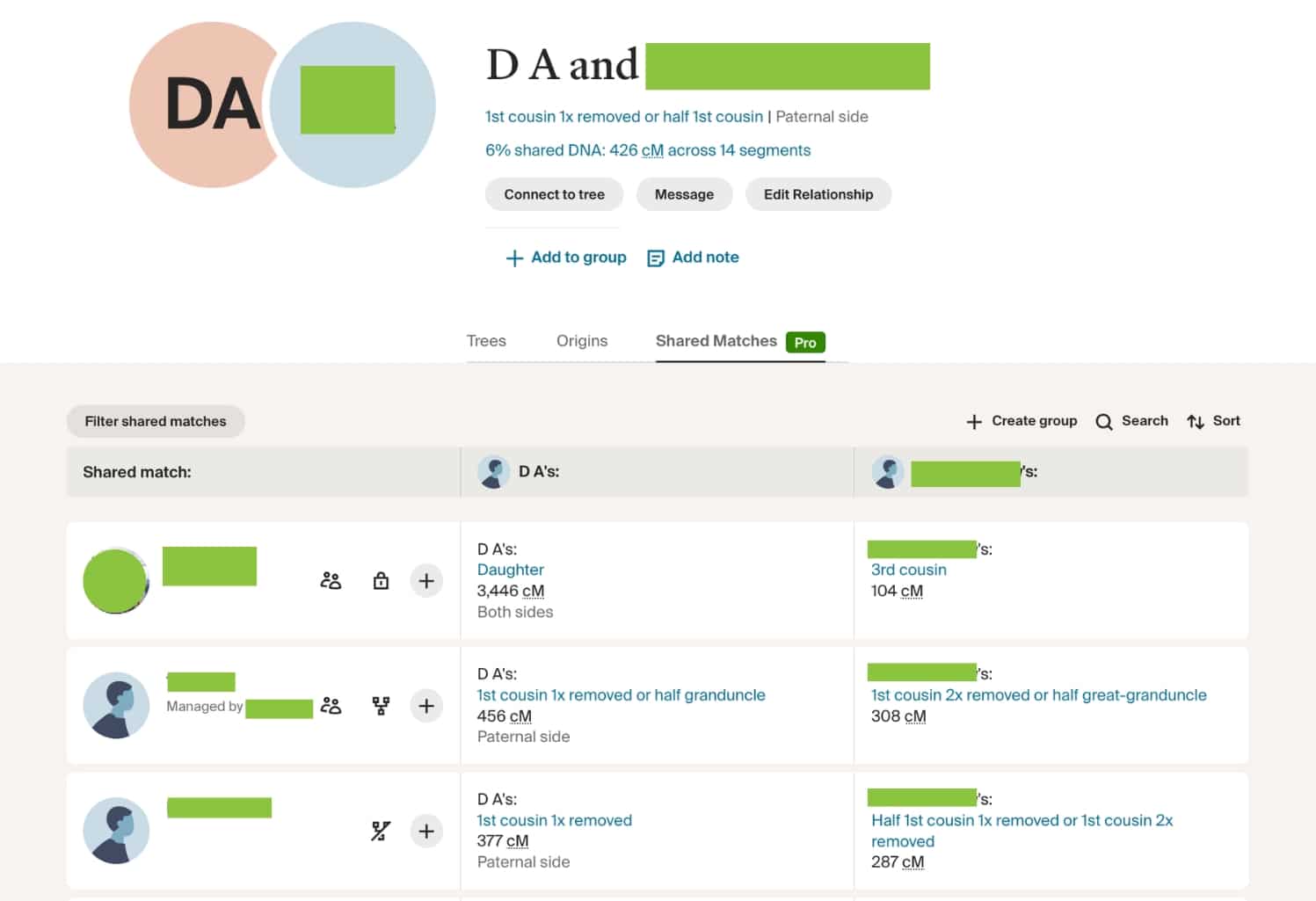
With the Shared Matches Pro, you can sort the matches by your relationship (your close to distant matches), by your match’s relationship (close to distant matches) and by date (newest to oldest).
Unlike Shared Matches, Shared Matches Pro helps you identify mystery matches. Using enhanced shared matches, you can identify mystery matches by seeing how much DNA they share with other shared matches. For example, the match below, John Smith (identity obscured for privacy purposes), shared 68 cM of DNA with the test taker, however, but have no trees, and I can’t figure out who they are based on their name and profile on Ancestry.

However, using Shared Matches Pro, I can see that John Smith’s mother and sister have both tested.
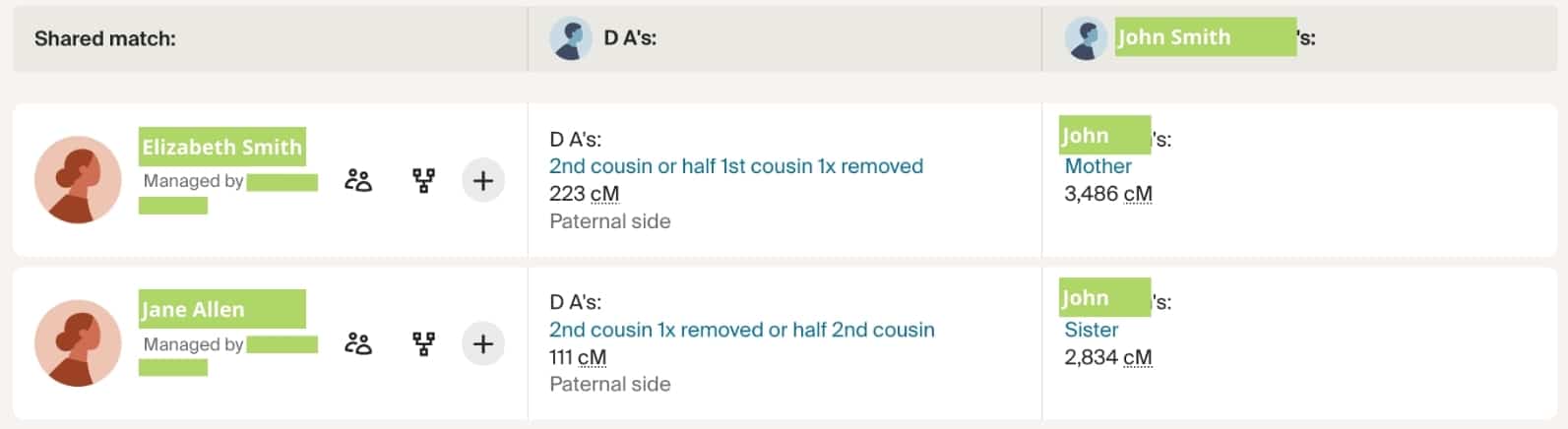
Thankfully, both Elizabeth Smith and Jane Allen have trees linked to their DNA tests, and after reviewing the trees, I have enough information to build a tree and identify D.A. and John Smith’s common ancestors.
Related Reads


A version of this article (written by Shannon Combs-Bennett) appeared in the January/February 2016 issue of Family Tree Magazine. Addition of “Ancestry Pro Tools: Enhanced Shared Matches” (written by Katharine Andrew) published online in February 2026. Last updated: February 2026.