
You can hardly watch the news, read an email, listen to a podcast, or open a newspaper without encountering a reference to artificial intelligence (AI). In fact, AI has changed how people get information—perhaps encouraging readers to turn to chatbots instead of those more-traditional media sources.
But AI has been around for much longer than the recent hubbub about chatbots would have you believe. Depending on how you define “AI,” the tech has powered tools that genealogists have relied on for decades: record hints, optical character recognition, DNA matching, ethnicity estimates, and more.
But when OpenAI’s ChatGPT tool launched in November 2022, AI captured the public’s interest and signified chatbots’ coming-of-age. The release of competing tools such as Claude, Google’s Gemini, Microsoft’s Copilot, Perplexity AI, X’s Grok, and even FamilySearch’s AI Research Assistant reinforced how the technology can be used in a wide variety of settings for a wide variety of tasks.
How can genealogists use ChatGPT and its competitors? Below are suggestions for how to use chatbots, plus specific AI genealogy prompts that will help you get the best results from them.
How Can Genealogists Use AI?
To understand what chatbots can do, your first question should be “How do AI chatbots work?” Tools like ChatGPT employ generative AI, in which a program trains itself on vast datasets to understand and analyze human language and conversational tendencies. Users enter a prompt (usually as text) in an accessible, conversational-style online chat box. The tool then uses its training to generate a response.
It’s important to note that the tool doesn’t “think” to provide answers—it merely predicts what a written response to your query should be based on the billions of texts and conversations it’s studied. The tools have been described as “autocomplete on steroids.”
With that in mind, AI chatbots do well with tasks that are rote and don’t require much creativity:
What AI can do well
- Summarize, sort and transcribe data: Run general analyses of or perform basic tasks to data that the user provides: looking for patterns, organizing entries, extracting information, etc.
- Brainstorm ideas: Get new ideas for your next research project, family history craft, reunion giveaway item, or book outline. Not all of AI’s suggestions will suit your needs, but they may help you think more broadly or consider new perspectives.
- Teach the basics of a subject: Learn surface-level information about a topic relevant to your genealogy: an unfamiliar term, a period of social history, or even how to code a family website in HTML. AI isn’t a subject-matter expert, but it might at least help you get a “lay of the land” or point you to more-authoritative resources. (As will be discussed later, be sure to fact-check any information you get from a chatbot.)
What AI can’t do well
- Conduct original research: You shouldn’t expect chatbots to provide new-to-you information about specific ancestors. They cannot access genealogy databases like Ancestry.com or FamilySearch, nor are they savvy enough to analyze online family trees. And because chatbots have a prime directive to answer your question, they’ll confidently give you detailed answers—even if they’re not true.
- Complete deep record analysis: Chatbots are heavily text-based and haven’t been trained on genealogy record formats. As a result, they may struggle to make sense of records that aren’t simply blocks of text—for example, extracting details from the columns of a census page. They also don’t have the expertise to determine what individual facts in a record might mean—for example, what other records to consult or what other people were involved.
- Be creative or make something new: Because it’s trained on existing information, AI struggles to produce anything that’s truly novel. AI-written text, for example, still reads as stiff and inhuman, though it’s getting harder to distinguish it from text written by a human. Chatbots are also not entirely up-to-date—their training only includes materials up to a certain date, so more-recent information might not register with them.
Tips for Better AI Genealogy Prompts
Give comprehensive, direct instructions
Steve Little, AI Program Director for the National Genealogical Society and founder of AI Genealogy Insights, emphasizes the importance of using intentional prompts with chatbots.
In a July 2024 episode of the Family Tree Magazine Podcast, Little says that successful AI prompts give the chatbot enough context to generate an appropriate response—and hopefully prevent it from “hallucinating” false information.
He argues the best resource for learning how to prompt is experience; simple trial-and-error can help users ask better questions. But effective prompts tend to have five recurring elements:
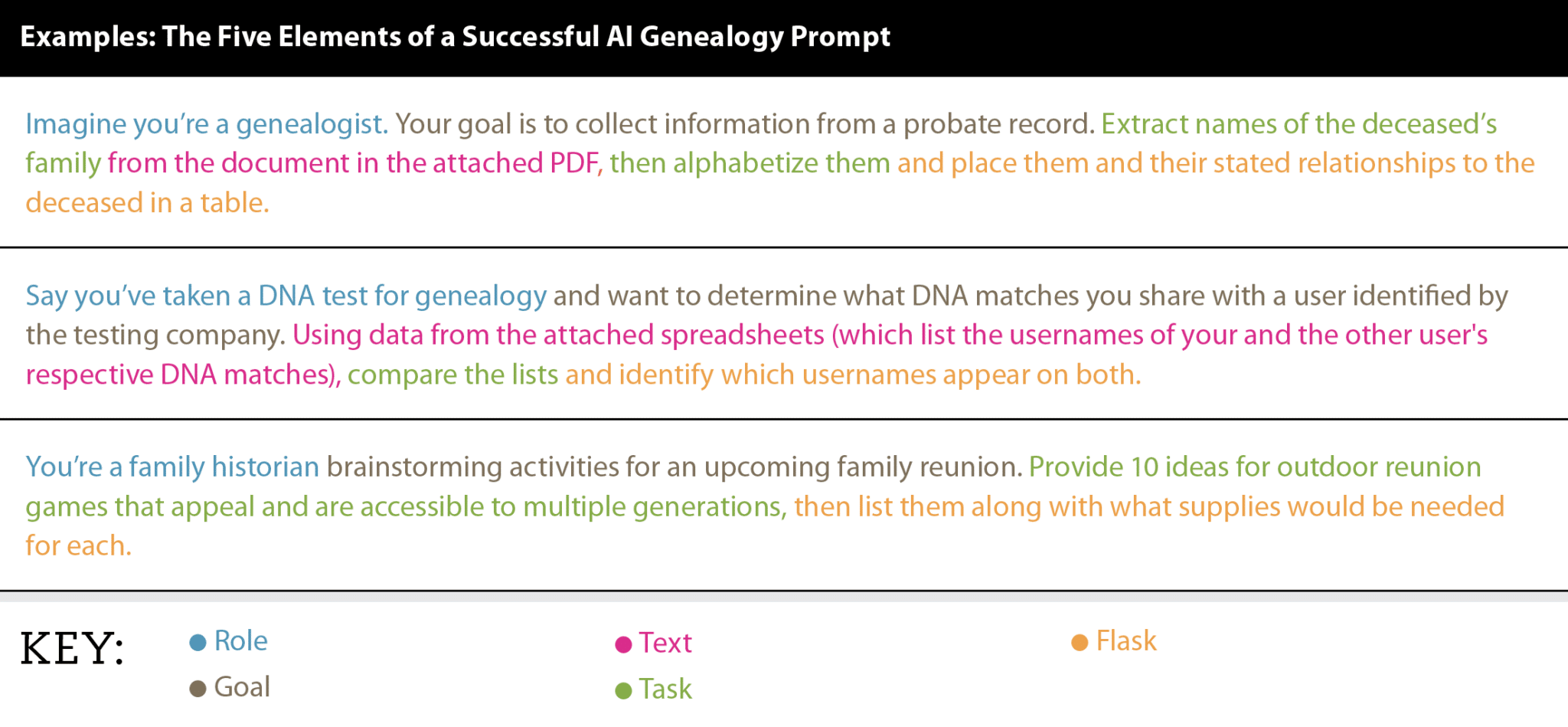
- Role: Encourage the bot to “think” like a certain kind of person. This sorts the prompt into a broad topic/language category and (hopefully) directs the bot to converse in relevant terms. e.g., “Imagine you’re a genealogist…”
- Goal: Clearly state what you’re trying to accomplish. e.g., “Your goal is to collect information from a probate record…”
- Text: Provide what specific dataset (if any) you want the bot to work with. This limits the scope of your inquiry and hopefully prevents the bot from reporting irrelevant or “made up” details. Most chatbots accept uploads of DOC and PDF files, or you can enter text into the prompt itself. e.g., “In the attached PDF…” with the file attached
- Task: Tell the bot what you want it to do. The sections below include a variety of genealogy tasks that chatbots are well-suited for. Be explicit and break down any complex tasks into distinct steps. e.g., “Extract names of the deceased’s family from the document, then alphabetize them…“
- “Flask“: In what “container” do you want the bot to put its response in? In other words: How do you want the chatbot to respond? In a list or table? In an image, spreadsheet or audio file? e.g., “…and place them and their stated relationships to the deceased in a table.”
Taken together, the elements create an AI genealogy prompt template that looks something like:
Imagine you’re a [Role] whose goal is [Goal]. Using [Text/attached document], do [Task] and report as a [Flask].
Here are a few example prompts using Little’s advice, color-coded in the image by the different elements:
- Imagine you’re a genealogist. Your goal is to collect information from a probate record. Extract names of the deceased’s family from the document in the attached PDF, then alphabetize them and place them and their stated relationships to the deceased in a table.
- Say you’ve taken a DNA test for genealogy and want to determine what DNA matches you share with a user identified by the testing company. Using data from the attached spreadsheets (which list the usernames of your and the other user’s respective DNA matches), compare the lists and identify which usernames appear on both.
- You’re a family historian brainstorming activities for an upcoming family reunion. Provide 10 ideas for outdoor reunion games that appeal and are accessible to multiple generations, then list them along with what supplies would be needed for each.
Learn more about this framework at Little’s website.
You may find that you can provide simpler instructions for certain tasks, particularly those that only require the chatbot to do something simple or open-ended. For example:
- List 30 genealogy questions to ask a relative in a family history interview.
- What does the word “endogamy” mean in genetic genealogy?
- Describe what life was like for a Union Army soldier serving in the U.S. Civil War.
Be specific
Another genealogy expert, Lisa Lisson of “Are You My Cousin? Genealogy,” has a similar four-part method for creating prompts: role, context, specific requests, and follow-up questions.
“Think of working with AI as having a conversation with a genealogy colleague who needs clear context to help you,” Lisson writes. “The quality of information you receive directly correlates to the quality of your prompts. A vague request yields vague answers, while a strategic prompt delivers actionable insights.”
One framework for creating specific instructions is the “SMART” goal-setting methodology. This encourages goals to be:
- Specific: Narrow in scope
- Measurable: Containing some metric for success (e.g., an endpoint or final result)
- Actionable/Achievable: Within a person/chatbot’s ability to complete
- Relevant (supporting your big-picture goals) or Realistic (achievable within the available time, skills and other resources)
The final SMART criteria is Time-bound (e.g., having a deadline). For AI genealogy prompts, the implied deadline is “now.”
Tell AI what not to do
AI is designed to answer your question—even if the answer it gives you has no basis in reality. Consider asking the bot to explicitly state if it doesn’t know the answer to something, or to limit its analysis to the information you’ve provided. You might also ask the bot to cite its sources or omit information from a certain place (for example, Wikipedia articles or social media platforms).
Revise your prompt
Just like keyword searches on big record websites, your AI genealogy prompts may need some tweaking if they don’t yield the results you were hoping for. Edit or retype your prompt to change the instructions, then resubmit them to see if your revisions worked.
You can also try typing a more open-ended response—because AI chatbots are conversational, they are designed to handle follow-up questions or requests. (In fact, bots over time can “remember” your previous conversations and adjust its responses accordingly.) For example, you might ask the chatbot to rerun its analysis with a different dataset or revise how it presented information.
Verify any details
Even with careful prompting, AI might provide inaccurate or incomplete information. Fact-check data provided by chatbots like you would data from any other resource, especially from online trees, family stories and other second-hand sources.
Aryn Youngless from “Genealogy by Aryn” recommends breaking AI-generated statements into specific phrases that can be evaluated separately using other records (especially primary sources). For example, a reported marriage generates several verifiable details: that the bride and groom existed by those names, that they married in a certain year, and that they married in a certain place.
In particular, Youngless notes AI is prone to making certain categories of errors that users should watch out for: anachronisms, too-good-to-be-true family trees, and overly simple solutions.
The following sections feature AI genealogy prompts for a variety of tasks. Each was tested using Google Gemini.
Research Tasks
Be more productive and skip tedious to-do’s by using AI as a research assistant.
Summarize a long document and/or extract details from it
- Imagine you’re a genealogist reviewing old land records for family history details. Analyze the attached record of a real-estate transaction and provide a summary of its key terms.
Identify trends in data
- Say you’re a statistician reviewing the open-response results of a survey of genealogy society members. Read the responses in the attached PDF and summarize 10 key recommendations from responses.
Suggest a research plan and/or areas of further research
- Imagine you’re a genealogist who has two hours to spend on research. You need to accomplish the following tasks: [list tasks]. Provide a suggested itinerary for a two-hour research session that efficiently completes these tasks.
- Say you’re researching an ancestor who lived in 1800s New York City. You have already found him in census records. What other genealogy records should you look for him in?
Define basic terms or provide an overview of a topic
- Imagine you’re a high school science teacher preparing a lesson on genetics. Create a table that defines the different kinds of DNA (autosomal DNA, Y-DNA, and mitochondrial DNA).
- Say you want to learn about an ancestor who lived during the Spanish-American War. What was life like for an active-duty U.S. Army soldier in the late 1800s?
Teach new skills
- Imagine you’re a family historian trying to preserve digital files. How can I attach metadata to my digitized family photos, and what data should I include?
- What HTML code would I use to change the background color of a table on a family history website?
Organization Tasks
Help make sense of your existing research using AI.
Sort data
- Sort the following names into alphabetical order by last name: Albert Smith, Joy Jones, Terrence Melchior, Roberto Flores, Victoria Jones, Sarah Woodson, Adam Jansen.
- Say you’re a genealogist creating a filing system for your family history files. Generate a tiered filing system that is flexible enough to accommodate a wide variety of files from multiple families: physical vital record certificates, printouts of census record pages, family photos, and so on.
Generate a timeline
- Imagine you’re a genealogist studying the history of the Smith family. Analyze the following obituary for Albert Smith and generate a chronological timeline of his life. [Editor’s note: Without being asked to do so, Gemini included emojis for each life event in the timeline.]
Create source citations
- Using the Chicago Manual of Style, generate a source citation for a 1950 census record of New York City found online at FamilySearch.org. [Editor’s note: Gemini provided a template as well as a note that the full citation needs additional details: an enumeration district, sheet number, household name, and URL.]
Creative and Storytelling Tasks
Think outside the box by seeing what suggestions AI has for your next writing project, family reunion, or interview.
Brainstorm ideas for genealogy games, gifts and more
- You’re a family historian planning genealogy-related Christmas gifts for your loved ones. List 10 gift ideas that incorporate family history.
Generate writing prompts or interview questions
- Imagine you’re a family historian preparing for an interview with a relative. Suggest a list of questions to ask and group them by subject.
- Say you’re an aspiring author who wants to write and publish a memoir about your life. Create a list of 50 writing prompts that can serve as the basis for a memoir.
Proof text for spelling, grammar, etc.
- Imagine you’re a newspaper copy editor. Read the text in the attached document and list any spelling, grammar or punctuation errors.
Review text and suggest improvements
- Say you’re trying to convince a distant relative to take a DNA test for genealogy. Write a short letter that discusses why the person should test and addresses concerns about privacy.
- Imagine you’re a professor of creative writing who’s helping a student with an assignment. Read the attached essay from the student and provide specific suggestions for how to make the text easier to read and more engaging.
Create ‘original’ images
- Imagine you’re making a presentation for an upcoming family reunion. You want to include interesting historical images to accompany the details of your ancestor’s life in 1920s Chicago. Generate a “birdseye view” illustration of early 20th-century Downtown Chicago and the Lake Michigan shoreline.
- Imagine you’re making a presentation for an upcoming family reunion. You want to include interesting historical images to accompany the details of your ancestor’s life in Gold Rush-era Alaska. Generate an illustration of a typical mining camp from that time period.
Editor’s note: Because chatbots have been trained on artists’ work, the images they create may not be totally original. Be careful when using AI-generated images as a result; copyright laws haven’t yet caught up with advancements in technology.
Related Reads



A version of this article was posted online in September 2025.


