
It often feels the big genealogy websites are in a foot race with one another. The rules of the contest have changed over the years, but the innovative, competitive spirit remains.
First, the “event” was over record collections and family trees. Then, it was a race to collect the most DNA data. And now, the athletes are training to compete in the latest tech race: artificial intelligence.
I’ve previously written about AI chatbots and how genealogists can use them. Most were created by new, innovative companies (OpenAI for ChatGPT, Anthropic for Claude) or well-established tech giants (Google’s Gemini, Microsoft’s Copilot). But there’s not a single such AI tool specifically for family history.
Sorry, my meaning there might not have been clear: There’s not a single such AI tool specifically for family history. In fact, there are many, some of which have come online even since I wrote that article earlier this year.
The past few RootsTech conferences have showcased how the largest genealogy companies—Ancestry.com, FamilySearch and MyHeritage—are investing in artificial intelligence.
With so many AI tools now available, you may not know what tasks each can do (or how well it can do them). Here’s a roundup of just some AI-assisted products that the three biggest genealogy websites recently rolled out.
AI Tools for Transcribing Genealogy Documents
Billions of microfilmed records have been scanned by the likes of FamilySearch and local archives. Many of those images live online, albeit in an unindexed state. For years, indexing those digital record images has been a limiting factor in how useful they are for genealogists.
Full-Text Search (FamilySearch)
That changed in March 2024, when FamilySearch released a groundbreaking tool: Full-Text Search. The technology deploys AI to analyze and transcribe records that had previously been unindexed—making them searchable for the first time.
That means FamilySearch’s massive backlog of 5.3 billion images scanned from microfilm are more accessible than they’ve ever been. Instead of spending hours browsing images (often without a guarantee that they’ll mention an ancestor), users can now find relevant records with a simple keyword search. As of March 2026, Full-Text Search has analyzed over 2.3 billion record images—and they’re all free to view.
Full-Text Search’s developers say they prioritize record collections from places that otherwise haven’t been well-represented. An early addition, for example, was a collection of plantation records from the American South. The search has expanded to include records from nearly 30 countries.
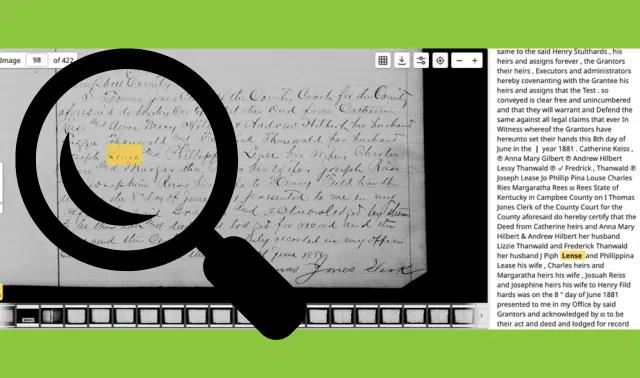

And FamilySearch isn’t finished with the tool yet. In addition to adding more records, the site is toying with features that will make Full-Text Search even easier to use. At RootsTech 2026, FamilySearch announced Simple Search, another beta “Experiment” that allows for conversational language in searches rather than a traditional set of keywords. This evolved into its “Simple Search” way of searching.
We’ve found the site’s transcription to be highly accurate, if imperfect (especially at understanding records that have unique formats.) Find a link to our full review above.
Scribe AI (MyHeritage)
In March 2026, MyHeritage raised the stakes with its release of Scribe AI. In addition to transcribing records, the tool can also translate them—and, critically, provide essential context around when, where and why the document (or photo) was created.
Unlike FamilySearch’s Full-Text Search (which merely transcribes text, without considering format), Scribe AI analyzes an image and applies one of several schema. That allows the tool to provide context specific to what’s pictured: for a family photo, the era of a person’s clothing; for a tombstone, an explanation of an unusual symbol; and for a genealogical document, background information about its creation. Better still, Scribe AI provides short notes about its reasoning, making it easy for you to fact-check its work.
This level of analysis makes Scribe AI stand out. “Think of it as your personal AI historian: deeply knowledgeable, fluent in many languages, and available to provide expert consultation,” reports a blog post announcing the feature.
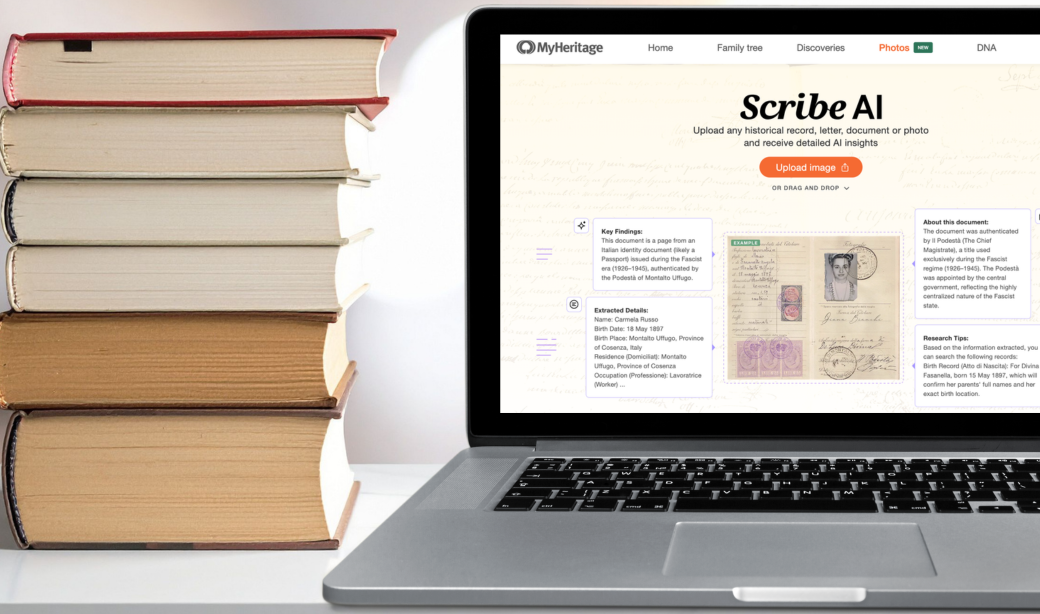
Scribe AI can work both on records you find at MyHeritage and images you’ve uploaded from your own collection. You can use the tool on a limited number of images for free; additional uses require either the Complete or Omni subscription to MyHeritage.
Our editors have been impressed with both the accuracy and the insight provided by Scribe AI. I interviewed the product-manager behind the tool in a recent episode of our podcast. And you can find our review at the link above.
Search Full Text (Ancestry.com)
Ancestry.com’s answer to the aforementioned tools is “Full Text Search” (Search > Search Full Text). Still in beta, Ancestry.com’s Full-Text Search works only on certain records on the site, such as local histories and newspapers. And the tool is restricted to All Access members.
Despite having a similar name to FamilySearch’s tool, Ancestry.com’s Full Text Search works differently. As of this writing, Ancestry.com’s search covers only documents that the site has applied OCR technology to. That is: Rather than applying AI to make new transcriptions of documents, the tool merely allows users to search the full text of records for which the site already has a transcription.
That said, Ancestry.com’s Full Text Search can work on images uploaded by the user—including handwritten documents. As of this writing, it’s compatible with multiple languages: English, Spanish, French, German and more.
It’s still too early to tell how effective Ancestry.com’s Full Text Search will be. But it’s almost certain (given the popularity of FamilySearch’s similar tool) that this will be an area of focus for Ancestry.com in the coming years.
AI Tools for Telling Family Stories
Genealogists are generally great researchers. But many struggle with another crucial aspect of family history: telling meaningful, engaging stories that will get others interested in research. With a recent emphasis on storytelling, the big genealogy websites are leveraging AI to help.
AI Stories (Ancestry.com)
Launched in December 2025, AI Stories use the information found in records to generate a plain-language summary of the relevant event and an audio narrative that fleshes it out into a full story. By combining details from the record with storytelling techniques and contextual information, AI Stories create a more-holistic, immersive narrative.
To get started, view a record page either from a search or from a person’s tree profile. Click the Listen and Explore button to have the tool create a short text summary and audio file. Note: You’ll need a paid membership to Ancestry.com to use the tool, just as you do to view most records in the first place.
Beneath the summary and audio, you’ll also find a series of related subjects. Click a topic to be directed to a chat-like window, where the site explains the topic at some depth. You can do something similar with documents or letters you upload to Memories.
For example, AI Stories spun a tale out of the immigration record for my grandmother, who arrived to the U.S. via a WWII-era displaced persons program. The story gave extra context that her port was a prominent one for displaced persons. It added some pathos, too, stating that her seemingly straightforward record “rests on years of disruption in the background: war, occupation, new borders, and the slow work of rebuilding.” Suggested follow-up topics included “displaced persons transport” and the “Bremerhaven resettlement hub.”
AI Biographer, Tribute Reels, and Family Infographics (MyHeritage)
MyHeritage launched a similar tool a month earlier in November 2025: AI Biographer. Using tech from OpenAI (the company that created ChatGPT), AI Biographer generates a “well-written, Wikipedia-style” article about your ancestor.
Users can instruct the tool to use only the information from the tree profile (“Standard”), or to add details from records and other information on the web (“Enhanced”). When available, AI Biographies will include photos and document images.

In May, MyHeritage released a pair of additional storytelling tools: Tribute Reel and Family Infographics.
Tribute Reel uses the photos you’ve uploaded of a person to create a video meant to memorialize their life. Similar to the company’s Deep Nostalgia and LiveMemory technologies, Tribute Reel animates the selected photos using AI. Then it compiles those animations into a short video set to music.
In a similar way, Family Infographics are AI-generated illustrations that incorporate various elements: photos, details from family trees, and a handful of artistic styles (“Storybook,” “Golden Age,” etc.).
All three tools are free for a limited number of uses. Unlimited use require a Complete or Omni subscription.
AI Tools for Assisting with Genealogy Research
Most people don’t have the know-how for professional-grade research, even of their own family. Nor do many have the resources to hire professional genealogists to do that work for them.
Instead, what if you had access to an anytime research assistant that had been trained on thousands of documents? A “ChatGPT for genealogy”? That’s the thinking behind these dualing chatbots from Ancestry.com, FamilySearch and MyHeritage.
AncestryAI (Ancestry.com)
Ancestry.com has said little publicly about its plans for a chatbot. At RootsTech 2026’s Tech and Innovation Forum, the company’s Director of Marketing, John Crockett, teased an upcoming “dedicated AI coach, project-manager personal assistant, all rolled into one.”
That said, at least some users are now seeing an “AncestryAI tool” in their accounts. From a tree profile’s LifeStory tab, click Ask AncestryAI to ask one of a handful of questions related to that person’s life events. You can ask prescribed follow-up questions, as well, but the tool doesn’t allow you to add your own as of this writing.
For my grandmother, for example, AncestryAI suggested “What could [she] have worn on her wedding day?” The response described traditional outfits in her area and some factors that might have affected her decisions: a preference for modesty in dress, wartime supply shortages, and the seasonal climate.
AI Research Assistant (FamilySearch)
One of FamilySearch’s “Experiments,” AI Research Assistant offers support in two ways.
First, it functions as a chatbot. Once you’ve turned on AI Research Assistant from the Labs page www.familysearch.org/en/labs, go to a person’s Tree profile and click Details > Research Help. Click the green AI Research Assistant button to open the chat, where you can ask the bot questions about your ancestor.
To get you started, FamilySearch suggests a handful of sample questions, such as “Who was this person married to?” and “Who were this person’s parents?” But you can come up with your own queries, too. And, helpfully, the chatbot responds only in relation to the person you’re viewing.
From my (other) grandmother’s profile, I asked AI Research Assistant what life in her neighborhood in 1940s Cincinnati would have been like. The response provided an overview of the “vibrant” neighborhood, which had a “rich cultural scene and a strong sense of community” and was “characterized by its steep hills and scenic vistas of the Ohio River.”
These descriptors seem accurate based on my existing knowledge of the place, but the bot didn’t cite its sources. If it had, I could have clicked the box icon at top-right to see them. Those would have provided valuable research leads, whether or not the assistant was correct in citing them.
AI Research Assistant also provides tree-extending hints on your home page—specific suggestions for who might be your ancestor’s spouse, child or parent. Think of these as record hints that target people rather than life events—they identify possible relatives to add to an ancestor’s profile, not just data points.
Once enabled, the tool can provide up to five suggestions on your home page. These are drawn from records that mention your known relative—perhaps other household members who appear in the record, but not in your relative’s profile.
Click Review & Add for more detail. This shows the possible relative’s name and what record supposedly connects them to your ancestor. View the record yourself, or attach the person to your ancestor’s profile. Learn more at www.familysearch.org/en/blog/ai-research-assistant-home-page-hints.
GAIA (MyHeritage)
Another new product teased at RootsTech 2026 was GAIA (Genealogy AI Assistant), a chatbot from MyHeritage. GAIA will reportedly be able to field “any” user-submitted question about one’s family tree, then provide research guidance.
Daniel Horowitz, MyHeritage’s Genealogy Expert, characterized the technology as “moving very fast on the roadmap.” The tool was being beta-tested as of March 2026; it’s possible (and perhaps even likely) that you’ll have access to GAIA by the time you’re reading this article.
According to Horowitz, GAIA is trained to respond only to specific inquiries about the user’s family tree. That will narrow the scope of its guidance, hopefully avoiding the “hallucinations” sometimes made by general-purpose large language models.
As often happens with emerging technology, companies are rolling out new tools at a fast clip. As you’ll see in the sidebar on page 55, many are still in beta-testing; some work well, and others still need significant improvement to clear research “hurdles.”
Needless to say, we’re just at the beginning of this AI race.
A version of this article appeared in the July/August 2026 issue of Family Tree Magazine.
Related Reads